
* THESE NOTES ARE CURRENTLY UNDER DEVELOPMENT AND ARE NOT 100% ACCURATE *
All images, text, JavaScript and HTML Code ©1995- by llamamusic.com
This web browser utility reads D‑10 Bulk Dump *.SYX files from a computer, tablet or smartphone and displays all Patch & Tone names. It was designed to create Patch and Tone listings from all of my Roland and third‑party PCM cards (PN‑D10‑03, Valhala, Best Choice, Voice Crystal, etc...) and various D‑10 SysEx files downloaded from the Internet. The method used is to LOAD ALL from a PCM card or RAM Memory Card into Internal Memory and then perform a BULK DUMP (Dump One Way ‑ All) on the D‑10 to create a valid SysEx file. Likewise, you can also load D‑5/10/20/110 SysEx files into the D‑10, perform a BULK DUMP and save SysEx files which can then be read by this utility. This utility will not work with any SysEx files previously created on a D‑5, D‑10, D‑20 or D‑110 synth (unless it was saved on a D‑10 using BULK DUMP (Dump One Way ‑ All)
Version 1.0(a) - 12/31/2023
     • Initial Release
Version 1.1 - 02/22/2024
     • Fixed a bug which was not displaying "Less Than" and "Greater Than" characters for Patch and Tone Names ("<" and ">")
Notes About D‑10 SysEx Bulk Dump Files & Synth Structure
- As you have probably noticed, there are several D‑10 SysEx files to be found on the Internet. Not all of these files will load correctly into the D‑10. Likewise, not all of these files will work with this utility. This utility is designed to work only with D‑10 SysEx files created using the BULK DUMP (Dump One Way ‑ All) method. This utility is able to tell the difference between SysEx file structures when you load them. The size of a Dump One Way ‑ All file is ~44KB
- There are a few D‑10 Patch banks in a *.ZIP file at this link which you can use to test the program, all saved as BULK DUMP (Dump One Way ‑ All)
 D-10_Reader_SysEx_Test_Files.zip
- SysEx files created on a D‑110 will load on a D‑10 but only 128 Tones will be loaded. No Patch info will be transferred. This is because D‑10 Performance Patches, Rhythm Patterns and Rhythm Tracks are not compatible with the D‑110. Keep this in mind when working with D‑110 files on a D‑10 because the Patch columns will have generic or blank enteries

- When using this utility on a Mac system, to speed up the load process, open a Finder window and search for all *.SYX files. Drag one file at a time from the Finder window directly onto the "Choose File (Safari/Chrome)" or "Browse (FireFox)" button in this browser utility. The file will then be read automatically without having to drill down and search through several directories (click for larger image)
D-10 Architecture
P A T C H E S
There are a total of 128 user editable Patches on the D‑10. The settings you can change in Patches are:
Patch Name - Reverb - Assign Mode - Panning - Tone Select - Tuning - Split Point - Bender Range & more
When you load a SysEx file, these 128 user Patches are overwritten with whatever data is contained in the SysEx file
T I M B R E S
There are a total of 128 preset Timbres on the D‑10. The settings you can change in Timbres are:
Tone Select - Fine Tuning - Reverb Switch - Assign Mode - Bender Range - Key Shift
When you load a SysEx file, these 128 Timbre settings are overwritten with whatever data is contained in the SysEx file
T O N E S (User Editable)
There are a total of 64 user editable Tones on the D‑10. The parameters you can change in Tones are:
Common Parameters (Envelopes, LFO's, Frequency, etc...) - PCM Waveform - Structure - Tone Name & more
When you load a SysEx file, these 64 user Tones are overwritten with whatever data is contained in the SysEx file
T O N E S (Preset Internal)
There are a total of 128 preset internal Tones on the D‑10. These are hard coded on IC12 and cannot be edited (ROM)
When you load a SysEx file, these 128 preset internal Tones are unaffected
M E N U D I V I N G
While scrolling through the menus on the LCD, you will notice different prefixes in front of the various sound names
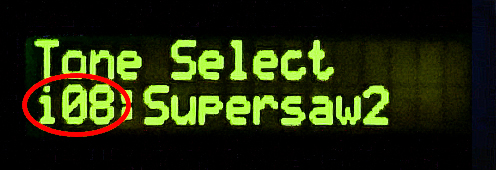
       i08 = User Editable Tone #08     (RAM) / Bank i  (Bank i Tones can be edited and/or overwritten by a SysEx file)
     I-A36 = User Editable Patch #36    (RAM) / Bank A  (Bank A Patches can be edited and/or overwritten by a SysEx file)
     I-B84 = User Editable Patch #84    (RAM) / Bank B  (Bank B Patches can be edited and/or overwritten by a SysEx file)
       a46 = Preset Internal Tone #46   (ROM) / Bank a  (Bank a Tones can not be edited and/or overwritten by a SysEx file)
       b17 = Preset Internal Tone #17   (ROM) / Bank b  (Bank b Tones can not be edited and/or overwritten by a SysEx file)
       r59 = Preset Internal Rhythm #59 (ROM) / Bank r  (Bank r Rhythms can not be edited and/or overwritten by a SysEx file)
Questions & Answers
Dr Driving Source Code - Best
private float steering; private bool braking; void Update()
Dr. Driving operates on a decoupled architecture, separating visual representation from physical calculation. This ensures the game runs smoothly at 60 FPS even on low-end mobile devices. Model-View-Controller (MVC) Pattern
Because of its highly optimized performance and small file size, developers, students, and enthusiasts frequently search for the . Analyzing how this game was built offers valuable insights into mobile game optimization, physics simulation, and memory management. 1. Engine and Development Environment
Renders the 3D meshes, UI overlays, dashboard instrumentation, and particle effects. dr driving source code
The phrase "dr driving source code" opens a window into two exciting worlds of software. On one hand, it describes the effort to unpack and modify the popular Dr. Driving mobile game through reverse engineering and modding. On the other hand, it points to the sophisticated, mission-critical algorithms that power autonomous navigation, known as Dead Reckoning (DR).
In the source code of many DR Driving versions, you’ll find conditional statements linking collision detection to ad triggers:
due to its robust physics engine and cross-platform capabilities. Unity Clone Tutorial : There are step-by-step guides on YouTube for making a Dr. Driving-style game in Unity , covering terrain creation and car mechanics. Web-Based Source Code private float steering; private bool braking; void Update()
This reconstructed code allows developers to create modified versions of the game, called "MODs." The most common modifications for Dr. Driving include:
Some developers use external libraries to interact with the game or build similar mechanics:
The primary driving logic is not about crossing a finish line—it’s about endurance. The pseudocode foundation: Engine and Development Environment Renders the 3D meshes,
In early versions, player profiles, gold currency, and unlocked cars were managed via local SharedPreferences files or lightweight SQLite databases saved directly on the device. Modern iterations have introduced server-side validation and encrypted save states to mitigate client-side source code exploitation, preventing unauthorized currency manipulation. 5. Key Takeaways for Mobile Game Developers
In the future, we can expect to see further advancements in DR Driving source code, including:
While many modern mobile games rely on Unreal Engine or heavy Unity setups, Dr. Driving was built using a highly optimized mobile framework. The core components focus on minimal memory overhead and rapid rendering. Language and Compilation
// Drift friction (The secret sauce) Vector2 forward = transform.up; Vector2 sideways = transform.right; float forwardVel = Vector2.Dot(rb.velocity, forward); float sidewaysVel = Vector2.Dot(rb.velocity, sideways);
| If you find some of this DIY info useful, please consider donating a small amount. All donations are used for future DIY sampler development. Thanks! | 
|
 Back To The D-10 Patch & Tone Reader Utility